Waitlist
A full diary should not turn people away
When there is nothing left to offer, take the name anyway. Then a cancellation is not a scramble: offer the freed slot to one person and hold it for them until they answer.
14 days free · No credit card · Cancel any time
01
Take the name, not the disappointment
Capture who wants in and roughly when, instead of losing them to the next shop.
- Preferred dates and times recorded with the request
- Existing customers matched, new ones captured as they are
- Which staff member they were hoping for
02
Work the list when a slot opens
A cancellation is a list to work through, and the states keep track of who you have already reached.
- Mark someone contacted, then confirmed
- Convert straight into a booking — no retyping
- The new booking respects the same availability rules as any other
03
Offer a freed slot to one person — and actually hold it
Most booking tools blast a cancellation to the whole waitlist and let people race for it. That is a scramble, and everyone who loses it remembers. Trimsy can instead hold the slot for the one person you chose.
- A cancellation or a no-show puts the freed slot on the waitlist page as a slot to offer
- You pick who gets it from the people whose request actually matches
- While the offer is live the slot is held — nobody else can book it, online or at the counter
- They get a page with a countdown and one tap to reserve it
- If they pass, the slot is released there and then — no waiting out the clock
- If they simply do not answer, the hold lapses on its own and the slot goes back on sale
- You set the hold window — 30 minutes unless you change it
04
Or let it go out automatically
Staff-confirmed offers are a choice, not a requirement. The automatic behaviour is still there and is still the default.
- Automatic: the moment a slot frees, up to three matching people get a book-now link
- Staff-confirmed: nothing goes out until you say who it goes to
- One setting, changed whenever the way you work changes
Walkthrough
The people you had to turn away
A full diary should not mean a lost customer. Take the name, the day they wanted and the service — then a cancellation becomes a call you already know how to make.
Step 1
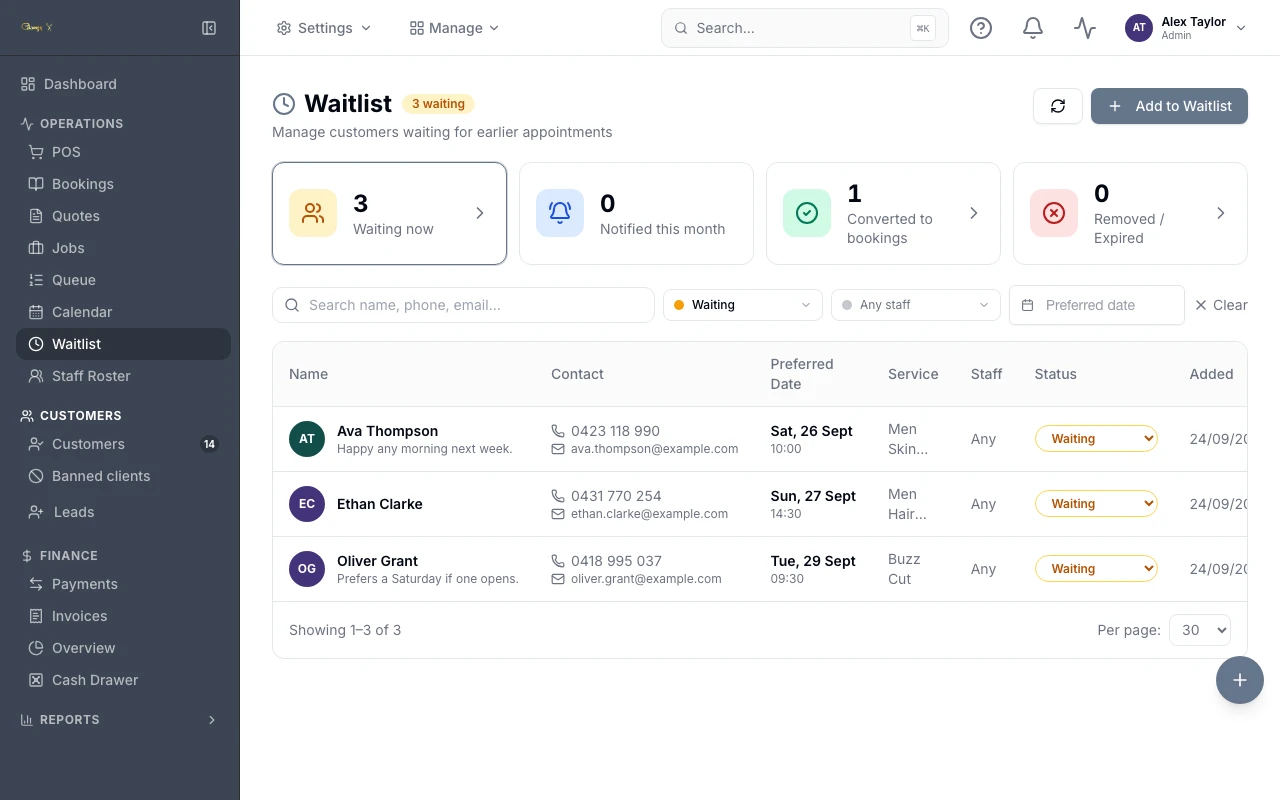
Who is waiting, for what, and when they wanted it
Preferred date and time sit beside the service and the staff member they hoped for, with their own note underneath — "happy any morning next week" is the difference between a useful call and a guess. Waiting, notified, converted and expired are counted at the top, so the list shows whether it is actually earning its place.
Step 2
A slot comes free, and you choose who gets it
Both states of a freed slot, on the same panel. The two o’clock is already offered and holding — 27 minutes left on the clock, and nobody else can book it while that runs. The half ten is still awaiting an offer, with the people whose request matches it listed underneath and a send button against each. One person, chosen by you, rather than a message to everyone and a race.
Step 3
What the customer opens
Your branding, the slot spelled out, and a countdown that is genuinely ticking against the hold. One tap reserves it. "No thanks, release it" hands the slot straight back — it returns to your diary immediately instead of sitting held until the timer runs out. Offering it to somebody else is your call, from the same panel.
Works with
The parts either side of this one
Everything else
The rest of the platform
Get started
Start free today.
14 days, no credit card, and your data comes with you if you leave.